


Module · Audits
Audit Management for Food Businesses
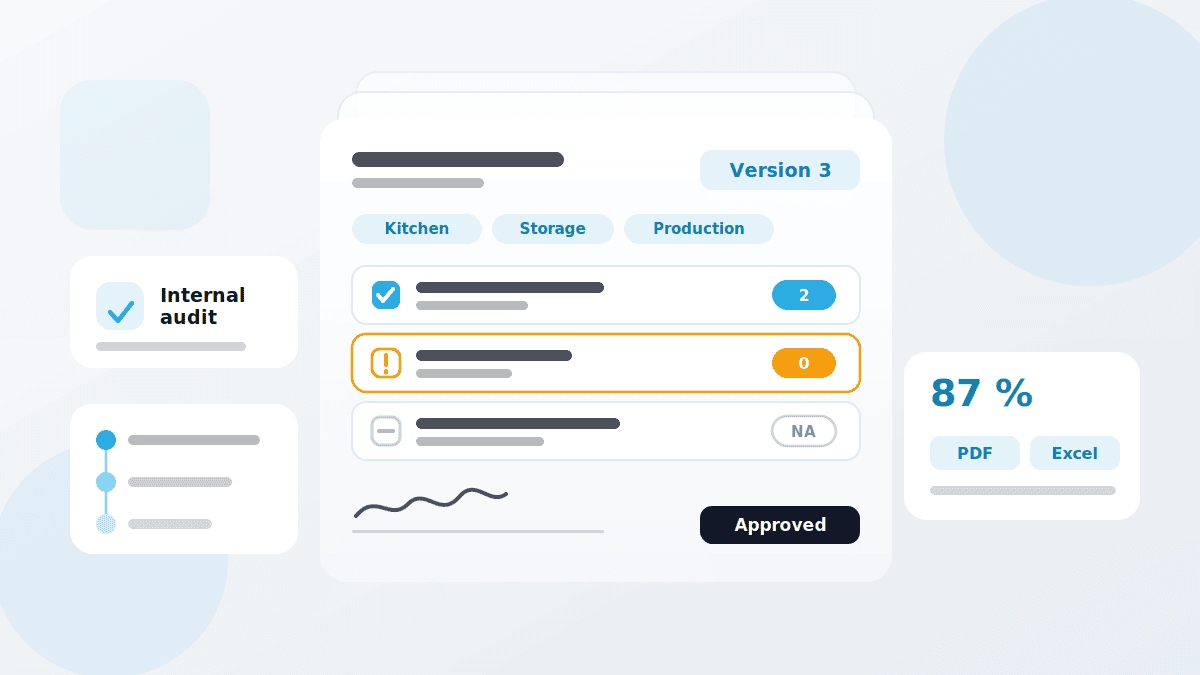
An audit is not a longer walk with a clipboard. It is a record that has to hold up later. In QMSpot you build audit templates, inspect by area and approve the result — and every change creates a new version automatically.
- Internal and external audits from one template
- Inspection by area and site
- Approval and automatic versioning

















What the audit module does
An audit template describes what is inspected and where. Individual audits are created from it — as often as you need them.
The difference to a checklist is the structure: an audit inspects whole areas against a fixed catalogue, is rated, and goes through an approval step. So the record shows not only what was inspected, but against which version — and who signed it off.
Rating is done in points, not ticks. For every inspection item you set a scale — typically 0, 1, 2 — and multiply it by weighting, likelihood and risk. The same check therefore counts for more in the kitchen than in the back office. What comes out is a percentage per area, per audit list and for the audit as a whole.
Audit type
Internal audit, external audit or a type of your own, such as a hygiene or safety check
Audit templates
Built once, reusable for every recurring audit
Inspection items
A rating scale per item, plus instructions, mandatory photo and KO criterion
Descriptions
A clear instruction on every item — fewer questions, fewer mistakes
Audit areas
Storage, production hall, kitchen: each area with its site and its owner
Weighting & risk
Points times weighting, likelihood and risk — you control what counts
Approval
A new audit list can only be used once it has been approved
Version history
Every change creates a new version, older ones stay traceable
How an audit runs
From template to approved report — four steps that repeat with every audit.
1. Create the inspection items
Bottom up: the individual items with their rating and weighting first — that avoids duplicates later.
2. Bundle and assign
Items into audit lists, lists into areas, areas into the audit template — each with its site and its owner.
3. Run the audit
The inspectors work through the catalogue, rate every item and sign off on the device.
4. Approve and file
Results go straight into the audit reports, filterable by date, category and owner.
How it works with the other modules
Cross-module, flexible and practical
An audit rates the current state. What follows from it happens in the other modules.
- Checklists & Inspection Plans — the same inspection logic for daily routines, while the audit covers the wider picture
- Defect Management — every item rated "not OK" is followed up as a defect
- Sensors & Temperature — unbroken measurement series as evidence instead of handwritten logs
- Training — proof of instruction belongs in every audit
- Device Management — the maintenance and calibration records an audit asks about
See audits in action
We show you the module using one of your own audit catalogues — no canned presentation, no obligation.
Your data is handled in compliance with the GDPR.