


Module · Product Recalls
Product Recalls in Food Businesses
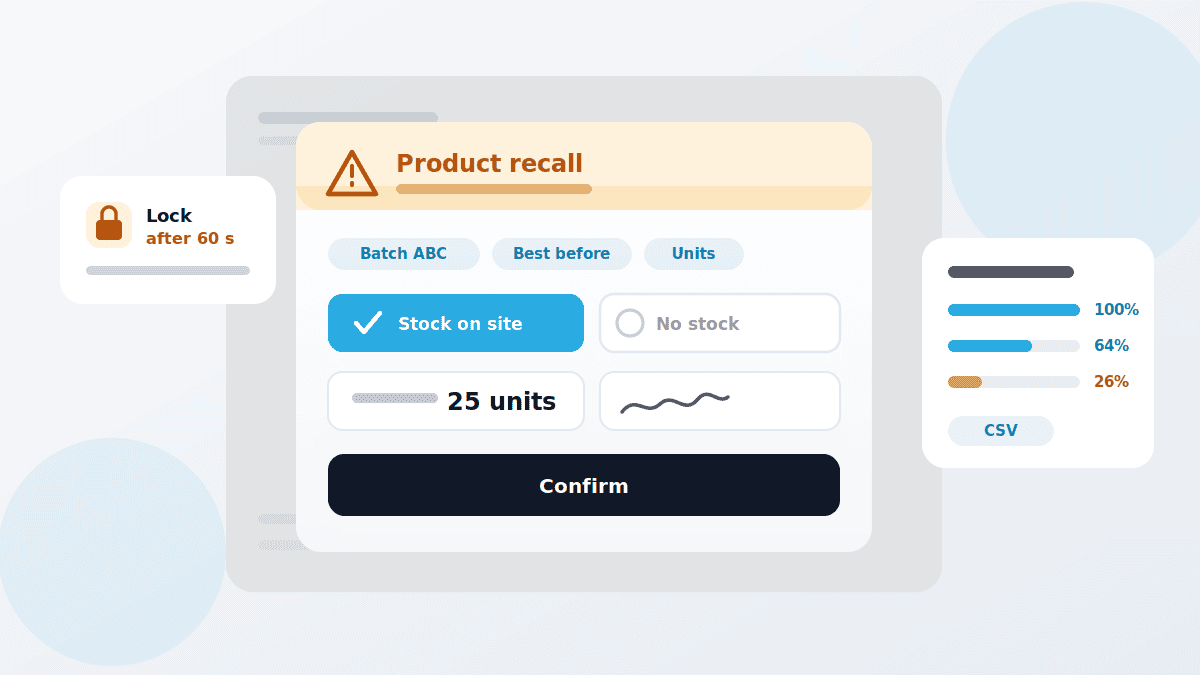
An email to all sites is not a recall. In QMSpot the recall appears as a pop-up for every affected member of staff, locks further work after a short grace period — and only releases once it is confirmed whether affected goods were on site, and how much.
- Pop-up at every affected site
- System lock until confirmation
- Quantity and signature per response















What the recall module does
What sets it apart from any other message: the information does not just arrive, it has to be actively confirmed.
Once every assigned site has confirmed, the recall switches to completed. For each response it stays visible which user confirmed what quantity and when, signature included. For IFS-certified businesses that is exactly the evidence documented crisis management calls for.
Live on save
Saving activates the recall, and the pop-up appears everywhere at once
System lock
Roughly 60 seconds of grace for the task in hand, then QMSpot locks
Batches and best-before
Lot numbers and, where needed, several best-before dates
Unit
Pieces, kilograms or crates — the basis for the quantity analysis later
Recipient selection
Individual sites or all of them, narrowed to user groups such as kitchen or sales
Dismissible
Optional: recipients may close the pop-up — for information-only cases
Mandatory confirmation
Goods on site or not, quantity of units disposed of, digital signature
Live analysis
Progress per site as a percentage, total units, CSV export
How a recall runs
From trigger to evidence — four steps that have to work under time pressure.
1. Create the recall
Name, a note covering the hazard and the required action, lot numbers, dates and unit.
2. Narrow the recipients
Select the sites and limit them to the user groups that are actually affected.
3. Save
Saving puts the recall live. The pop-up appears immediately for every recipient.
4. Collect confirmations
Each person reports goods or no goods, enters the quantity and signs — then the system reopens.
How it works with the other modules
Cross-module, flexible and practical
A recall almost never starts in the recall module. It starts with a reading, a defect or a finding.
- Sensors & Temperature — the measurement series show which batch a break affected
- Defect Management — a quality deviation that needs action can turn into a recall
- Checklists & Inspection Plans — the routine check is where the deviation shows up
- Audits — documented crisis management is one of the things an audit looks at
- Training — the 60-second grace period only makes sense to someone who was briefed on it
See recall management in action
We walk a recall through with you, from trigger to analysis — no canned presentation, no obligation.
Your data is handled in compliance with the GDPR.