


Module · Sensors & Temperature Monitoring
Temperature Monitoring for Kitchens, Cold Rooms and Cold Stores – Wireless, with Alerts
Several hundred sensors in use – including at EAT HAPPY
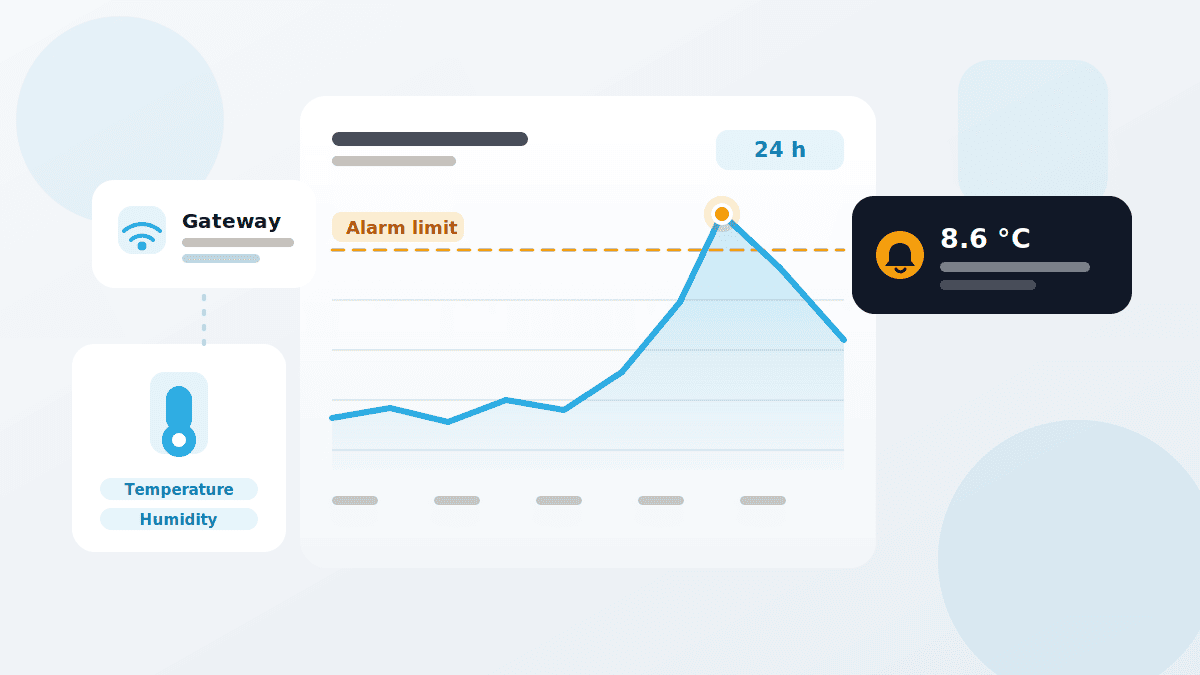
The cold chain does not break during an inspection. It breaks at half past two in the morning. Wireless sensors in QMSpot monitor temperature and humidity in restaurants and commercial kitchens around the clock – and alert you as soon as a limit is breached.
- Wireless sensors and data loggers from various manufacturers
- Upper and lower alarm limit per measuring point
- Alerts by email or in-app

















Hardware & Setup
You are not tied to one brand. QMSpot connects data loggers and wireless sensors from various manufacturers via a gateway – no cables through the kitchen.
Wireless sensors
For fridges, cold rooms, cold stores and freezers. The readings go wirelessly via the gateway straight into QMSpot.
Loggers with calibration certificate
For measuring points where traceability matters – for example in audits or for critical control points.
Door-open sensor
Reports an open cold room before the temperature even starts to rise.
Further measured values
Besides temperature and humidity, door openings as well as flow and consumption volumes are possible, depending on the sensor connection.
Rent or buy
Sensors are available to rent or to buy. How quickly you are up and running depends on whether you use sensors only or introduce QMSpot as a whole – we plan the timeline together in the demo.
What the sensor module does
A measuring point is a sensor with a name, a place and a set of rules. How it measures and when it raises an alarm is up to you.
For every measuring point you define an upper and a lower alarm limit. When it is breached, an alert goes to the recipients you have stored — staff who are responsible as much as external service providers, by email or straight into the app.
You are not tied to one brand on the hardware side: data loggers and wireless sensors from various manufacturers are in use, connected via gateway. Where a measuring point has to stand up to proof, sensors with a calibration certificate are available.
Sensor type
Temperature in °C or humidity in % — cannot be changed once saved
Assignment
Every measuring point belongs to a site or a device
Measuring interval
You define how often data is recorded
Tolerance and limit values
Short deviations raise nothing — you set how long is too long
Active period
The measuring point is only active when it should be
Categories
Group similar points, such as refrigeration or room climate
Wireless sensors
Data loggers and wireless sensors from various manufacturers, connected via gateway
Door-open sensor
Reports the open cold room before the temperature even rises
How to set up monitoring
From measuring point to alarm — four steps you set up once and then let run.
1. Create a measuring point
Name, measured value and assignment to a site or device. Temperature or humidity — the choice is final once saved.
2. Define the parameters
Measuring interval, tolerance and limit values, active period. The point only measures when it makes sense.
3. Configure the alarm
Set an upper and a lower alarm limit, pick the recipients, choose the channel: email or in-app alert.
4. Analyse the data
Charts over any period you choose, filtered by event. Compare measuring points and categories side by side.
How it works with the other modules
Cross-module, flexible and practical
Sensors measure around the clock. What follows from those readings happens in the other modules.
- Checklists & Inspection Plans — inspection items of the measuring point type pull their value straight from the sensor instead of a thermometer
- Defect Management — a breached limit becomes an action with an owner and a deadline
- Device Management — maintenance, inspection and calibration of the devices behind the readings
- Audits — unbroken measurement series as evidence in an audit instead of handwritten logs
- Product Recalls — when it counts, the data shows which batch was affected
See sensor monitoring in action
We show you the module using your own refrigeration points — no canned presentation, no obligation.
Your data is handled in compliance with the GDPR.