


Module · Defect Management
Defect Management for Food Businesses
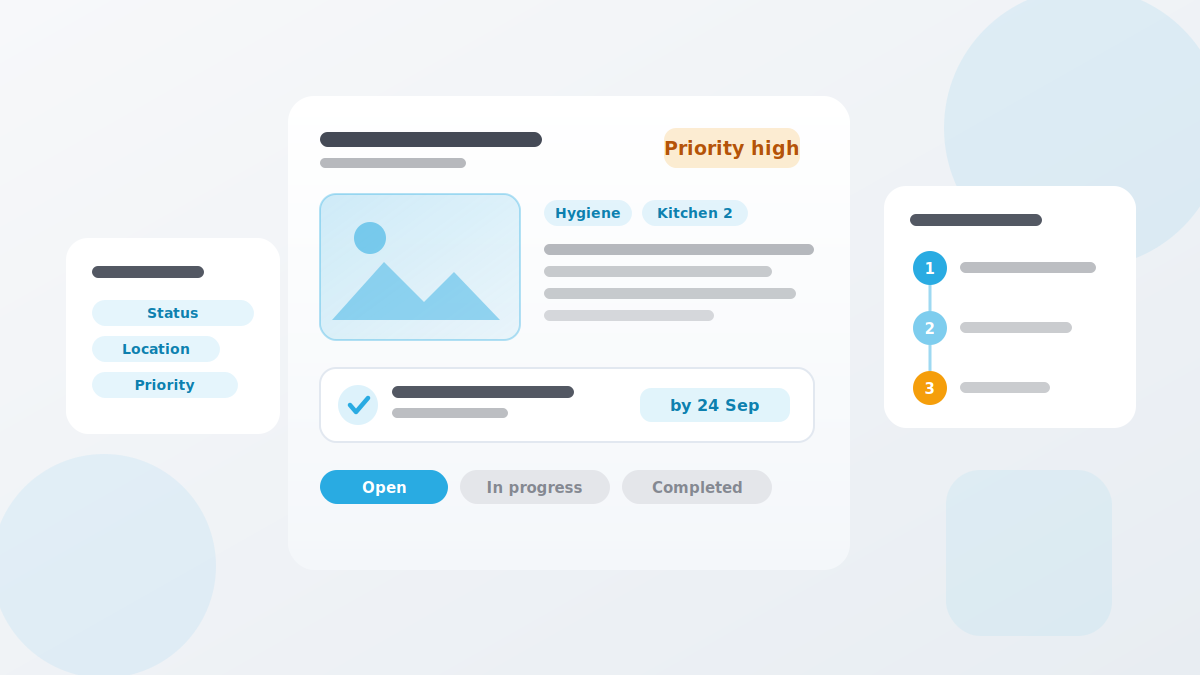
A defect is spotted quickly and forgotten just as quickly. In QMSpot it is recorded with a photo, a location and a priority, gets an action with an owner and a deadline — and escalates automatically when nothing happens.
- Report with photo, category and location
- Actions with an owner and a deadline
- Escalation levels by priority and time


















What the defect module does
A defect is more than a line in a list. It has a place, an urgency, an owner and a status.
Escalation is where this module stops being a to-do list. You define levels in a fixed order, triggered by a time frame, by priority, or by the number of defects left open. A critical defect no longer sits around just because the first person on the list is on holiday.
Photos and documents
Images and files attached to the defect — no need to ask what exactly was meant
Category
Stored on the inspection item and set automatically — not picked by the inspector
Priority
Low, medium, high — it drives response time and escalation; medium is the default
Location
The affected site or area, so it is clear where to act
Actions
At the moment of reporting or as a follow-up action, with an owner and a deadline
Escalation groups
Levels in a fixed order, each with its own deadline and its own user group
Status tracking
Open, in progress, completed — with comments and attachments
Filters
By status, category, location, priority, type or user group
How a defect is handled
From reported defect to completed action — four steps in one thread.
1. Report the defect
Title, description, category, priority and location — plus a photo where it helps.
2. Assign an action
Write the description, assign it to a person or group, set the due date.
3. Track the progress
Update the status, add comments and attachments until the action is done.
4. Keep the overview
Combine filters by status, location, priority or unassigned defects.
How it works with the other modules
Cross-module, flexible and practical
Defects rarely start in the defect module. They come out of daily inspection — this is where they are brought to a close.
- Checklists & Inspection Plans — deviations found during daily inspection land here as defects
- Audits — every item rated "not OK" is followed up as a defect
- Sensors & Temperature — a breached alarm limit is the trigger for an action
- Device Management — an incident on a device raises a defect automatically, and closes it again once the device is fixed
- Training — recurring defects often point to missing instruction
See defect management in action
We show you the module using a typical defect from your own operation — no canned presentation, no obligation.
Your data is handled in compliance with the GDPR.